


Rendering directional shadow maps in 2026 - Part 1
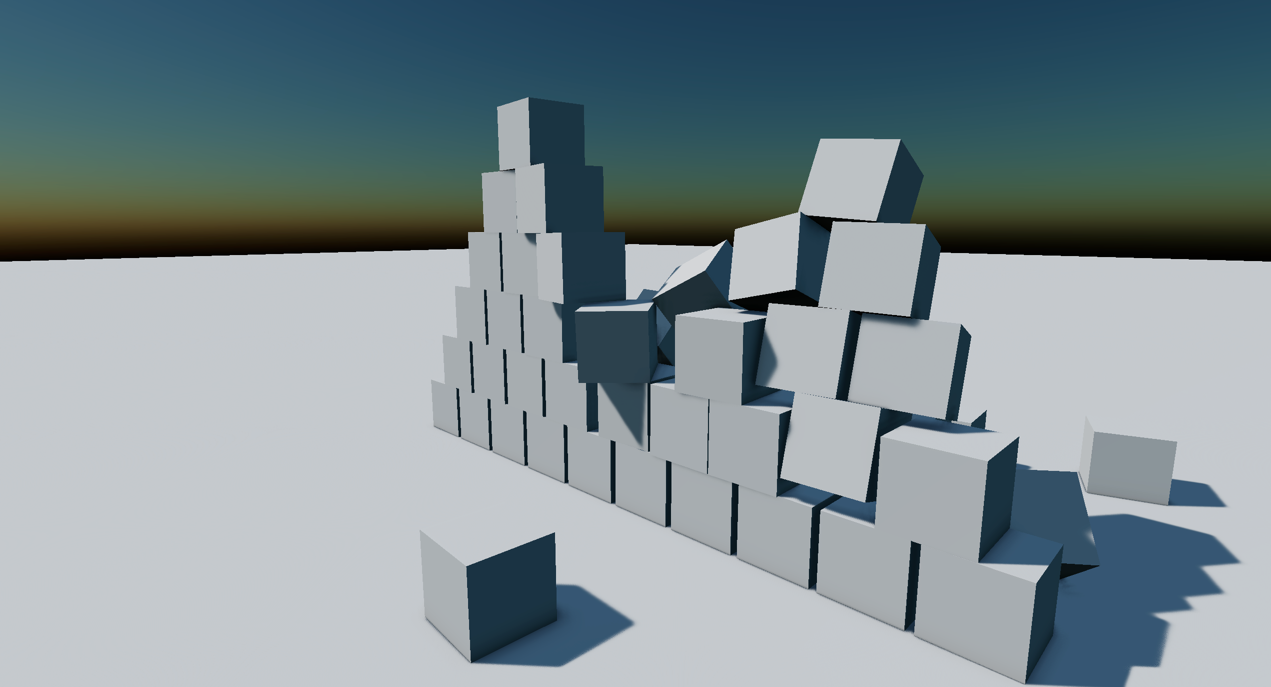
A few weeks ago, I was working on implementing a shadow map solution for one of my engine samples, and was quite surprised at how complicated it was to find up-to-date information on the subject. Not to shame any of the devs who have been publishing articles on the subject, but most articles tend to either focus too much on only a part of the subject, or are outdated.
It resulted in me having to spend a considerable amount of time researching and experimenting with different approaches before finally finding a solution that worked for me.
So, to aid future developers who may be facing similar challenges, I decided to write a series of articles on the subject, where I will try and present a comprehensive and up-to-date approach to rendering directional shadow maps. I will try to cover the many known techniques at each step, both the ones that are still relevant and the ones that have been superseded by newer techniques.
As this is a long and complicated topic, I have decided to break it down into four parts:
- Part 1: Rendering a simple directional shadow map
- Part 2: Shadow biasing
- Part 3: Shadow filtering
- Part 4: Cascaded shadow maps
To make this series accessible to the most, I will try to explain everything in detail (and avoid using too much jargon). Feel free to ask any questions you may have, and I will do my best to answer them, and fix the articles accordingly.
All along these articles, I will be providing interactive demos, both to illustrate and to allow you to navigate the scene, change the parameters, and see the possible issues for yourself. The scenes will be rendered using three.js WebGPU, so make sure to use a compatible browser. As such, code samples will be provided in JavaScript (for CPU code) and WGSL (for shaders).
We will be using the following demo scene:
Disclaimer: AI use
AI coding was used in the making of this series, to generate the rendering workflow that allows for the interactive demos. However, this entire series is based on my own experience, knowledge and research. This use was made to allow me to focus on the article itself rather than spending days setting up the rendering infrastructure.
Rendering a simple directional shadow map
The principle behind shadow mapping
Shadow mapping is a technique first presented by Lance Williams back in 1978. It tries to solve the following issue: How do we test if a given point is occluded from a given light source? Once we have a way to answer this question, we can use it to determine if a given point is in shadow or not.
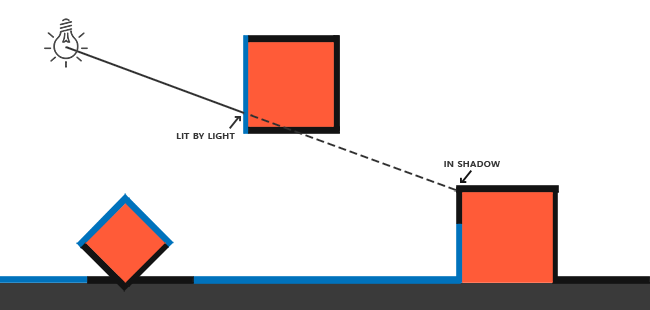
A naive approach would be to trace a ray for each fragment displayed on screen to the emitting light source, and if the ray is occluded, then the fragment is in shadow. It is a method actually used in some real-time rendering engines, using techniques like hardware raytracing or software ray marching. But it requires a non-negligible amount of computation and a specific separate spatial representation, which can be a bottleneck in real-time applications, especially on older hardware.
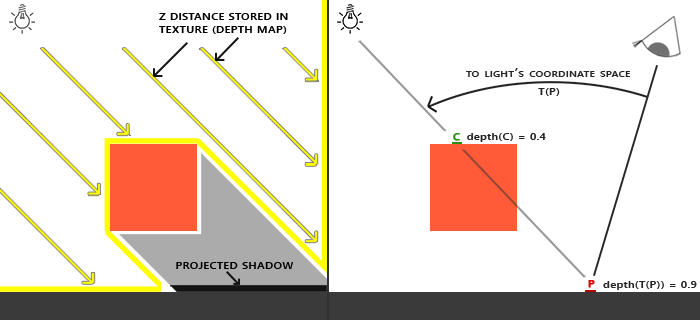
Shadow maps are an alternative to that method. The principle is to render a depth map of the scene from the light’s perspective, the so-called shadow map. Why do that? Because it basically allows us to trace a batch of rays! Each rendered pixel can be interpreted as the result of a ray trace. All this by using a standard rasterizer pipeline. This is what makes this approach so attractive.
If you use a directional light source, you can use orthographic projection, as it emulates parallel rays. For spotlights and point lights, since rays come from a single point, you need to use perspective projection instead.
To determine if a fragment is in shadow, you can project its position in the light space and retrieve the depth value at that point. If the stored depth value is closer to the light source than the projected point depth, then you can assume that this fragment is in shadow.
Rendering the shadow map itself
So, first, we need to render the shadow map. This is done by rendering the scene from the light’s perspective. The resulting depth map is then used to determine if a fragment is in shadow.
Setting up the light camera requires you to first retrieve the light position and direction to determine a view matrix, and then add an orthographic matrix to the mix.
That’s where things get a bit more complicated. Since you want your shadow map to detect occlusions in the scene, you need to make sure the entire scene is visible in the shadow map frustum. There are many ways to do this, but for now, let’s set it up manually.
Feel free to play around with the light frustum parameters to see how they affect the shadow map.
You will likely notice that the shadow map has a limited resolution. This means that you will need to make sure that the light frustum is as tight as possible to make better use of that limited resolution. But you also have to make sure that the frustum is large enough to cover the entire scene, because if you don’t, you will be unable to render shadows for objects that are outside the frustum.
But let’s say you want to render shadows for a large scene. You will likely have to choose between having a large frustum that covers the entire scene, or at least a large part of it, at the cost of diminished precision; or having a smaller frustum that covers only a small part of the scene, but which provides better precision.
This is a topic we will discuss a bit more in part 4 of the series, when we tackle cascade shadow maps. For now, let’s keep a small scene and implement our shadows there.
A good approach currently is to retrieve the bounding volume of the current scene and use it as a guideline for the light frustum.
Applying the shadow map
Now that we have our shadow map rendered, we need to project it onto the scene from the camera’s perspective.
The process is quite simple. We simply need to project the fragment world position into the light’s space, so basically we apply the light view-projection matrix to the fragment world position:
Now that we have the light-local position, we can simply sample the shadow map to check for shadow visibility: if the light-local position depth is closer to the light than the sampled value, we are in the light (so return 1.0), otherwise we’re occluded, so in shadow (return 0.0).
For instance, in WebGPU, the transform from NDC to UV space is:
let uv: vec2<f32> = (ndc.xy * vec2<f32>(0.5, -0.5)) + 0.5;
Do note that we will be using a comparison sampler here. Basically, it is an extension of the base sampler. You provide a comparison operator (less than, greater or equal,…) upon declaration, and a comparison value upon use in the shader. With nearest filtering, if the comparison returns true, it returns 1.0, otherwise it returns 0.0. (The comparison is done with the comparison value as the left operand, and the sampled value as the right operand.) Other filtering modes are possible and result in a weighted average of the comparison results from the sampled texels.
The similar result can be achieved with a regular sampler. You will need to manually do the interpolation yourself if you do so, but sometimes it allows for much more control this way. The comparison sampler has the added benefit of allowing for hardware acceleration of the sampling operation.
Alternatively, we can pre-apply the NDC-to-UV transform to the light-space matrix to avoid having to do the transform in the shader. $L = \begin{bmatrix} \frac{1}{2} & 0 & 0 & \frac{1}{2} \\ 0 & -\frac{1}{2} & 0 & \frac{1}{2} \\ 0 & 0 & 1 & 0 \\ 0 & 0 & 0 & 1 \end{bmatrix} \cdot {P}_{light} \cdot {V}_{light}$
Let’s see what we get:
It does not work quite as expected. If you look, you can see that we have shadows cast, but we also have these strange black artifacts, which will show up as a Moiré pattern. This phenomenon is called shadow acne, and it is a recurring issue with shadow mapping.
We will address this in the next part, “Shadow biasing”.
References
- Casting Curved Shadows on Curved Surfaces, Lance Williams (1978)
- Wikipedia - Shadow mapping
- Learn OpenGL - Shadow mapping chapter